


Activate-sales-automation-with-launchera-AI-chatgpt-integration
Activate-sales-automation-with-launchera-AI-chatgpt-integration. Modern businesses lose leads not because they don’t have traffic, but because they cannot respond, follow up, and engage every inquiry instantly. Every delayed reply, every missed message, and every forgotten follow-up costs sales.
This is exactly where Launchera AI Sales Automation changes the game.
By connecting ChatGPT inside Launchera, you can create AI Staff and AI Agents that automatically reply to leads, ask qualifying questions, send information, and move prospects through your sales workflows — without manual effort.
This guide shows you how to activate this system step by step.
Step 1 — Connect ChatGPT API from Launchera App Store
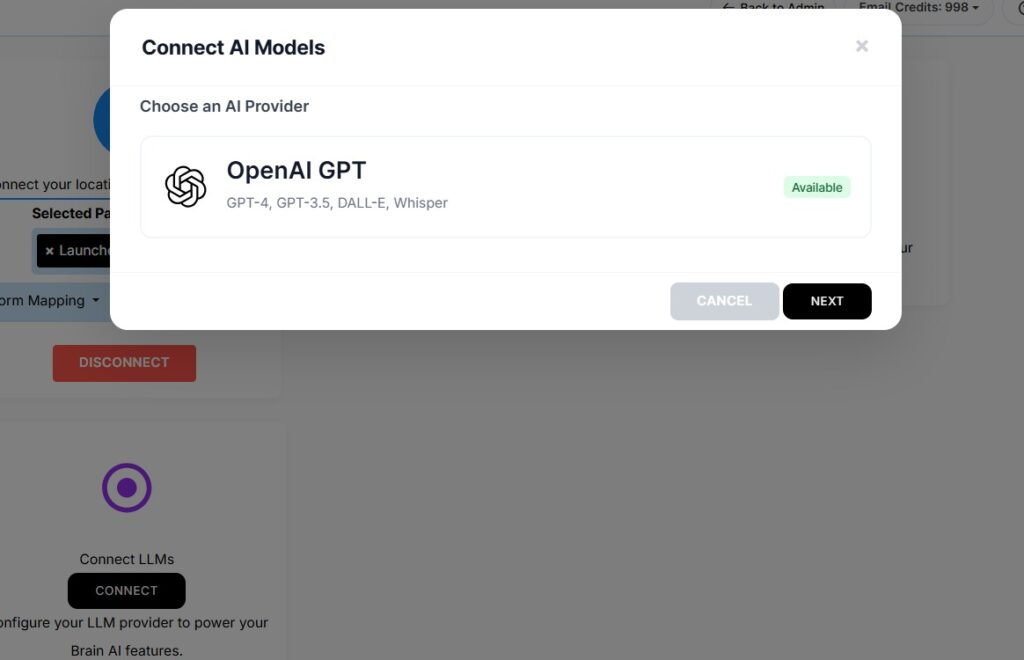
The first step is enabling AI inside Launchera.
Go to:
Settings → App Store → ChatGPT Integration
Here, you simply paste your ChatGPT API key and connect it to Launchera.
This connection allows Launchera to use AI inside workflows, messages, and automation sequences. From this moment, Launchera is no longer just an automation platform — it becomes an intelligent sales assistant.
This step activates the foundation of Launchera AI Sales Automation.
Step 2 — Create AI Staff and Define Its Role
Once connected, you create your AI Staff.
Think of AI Staff as a virtual team member. You define:
Its role (sales, support, follow-up, qualification)
How it should talk
What information it should provide
What tone it should use
You are basically training the AI to represent your business exactly the way you want.
For example, you can instruct it:

Step 3 — Provide AI Instructions and Knowledge
This is where the real power lies.
Inside AI settings, you give:
Business details
FAQs
Common objections
Product information
Reply logic
You are feeding the AI the knowledge it needs to answer customers correctly.
Instead of generic replies, the AI gives context-aware, business-specific responses.
This ensures your brand voice and sales pitch remain consistent.
Step 4 — Add AI Agent to Your Workflow
Now go to:
Automation → Workflows
Open any workflow where you handle leads, messages, or follow-ups.
Add a new action:
👉 AI Agent
This means whenever the workflow runs, the AI will perform the conversation automatically.
This is where AI meets automation
Step 5 — Choose the Trigger Points
Select when the AI should activate. For example:
When a form is submitted
When a WhatsApp message is received
When a lead enters CRM
When someone replies to your ad
When a follow-up is due
This ensures the AI responds exactly at the right moment in the sales journey.
No delays. No human dependency.
Step 6 — Automate Responses, Qualification, and Actions
Now define what the AI should do:
Reply instantly
Ask questions to qualify the lead
Share links, brochures, or pricing
Move the lead to next pipeline stage
Trigger WhatsApp or email follow-up
This turns your sales process into a fully automated conversation system.
Your leads feel like they are talking to a human — but it’s AI working 24/7.
Step 7 — Activate the Workflow
Click Save → Activate.
From this moment:
Every lead gets an instant response
Every inquiry is handled intelligently
Every follow-up happens automatically
Every sales conversation runs without manual effort
Your AI Sales Assistant is live.
| Step | Action Path | What You Need To Do | Outcome |
|---|---|---|---|
| Step 1 — Connect ChatGPT API | Settings → App Store → ChatGPT Integration | Open Launchera App Store and connect your ChatGPT API key to activate AI capabilities. | AI becomes available inside your Launchera system. |
| Step 2 — Create AI Staff | AI Staff → Create New | Create AI staff and define its role (sales, support, follow-up) with clear instructions. | AI understands how to talk to your leads and customers. |
| Step 3 — Define AI Instructions | AI Staff Settings | Provide prompts, tone, business details, FAQs, and reply logic for the AI. | AI replies exactly according to your business style. |
| Step 4 — Add AI Agent to Workflow | Automation → Workflows → Add Action | Insert the AI Agent into your existing workflows where responses or actions are needed. | AI becomes part of your automation system. |
| Step 5 — Set Trigger Points | Workflow Trigger (Form, DM, WhatsApp, Lead Capture) | Choose where AI should respond — new lead, message, form submission, or follow-up stage. | AI activates automatically when users interact. |
| Step 6 — Automate Responses & Actions | AI + Workflow Actions | Let AI reply, ask questions, qualify leads, send links, and move leads in pipeline. | Sales conversations happen automatically without manual effort. |
| Step 7 — Activate Workflow | Save → Activate | Turn on the workflow after adding AI Agent. | AI is now live handling leads, support, and follow-ups 24/7. |
What Happens After Activation?
Here’s what your system now does automatically:
- Lead comes from website, ad, WhatsApp, or form
- Workflow triggers
- AI replies instantly
- AI asks qualifying questions
- AI shares relevant information
- Lead is moved in CRM
- Follow-ups continue automatically
How Launchera Makes AI Sales Automation Simple, Practical, and User-Friendly
A New, Powerful, Yet Simple Addition to Launchera
This AI integration is one of the newest and most powerful enhancements to Launchera. It is built to be extremely user-friendly, so even non-technical users can activate advanced AI sales automation within minutes.
Click HereAI sounds powerful in theory, but for most businesses, it feels complicated to implement. You may wonder: Do I need technical knowledge? How do I train the AI? How does it connect to my existing process?
This is exactly where Launchera changes the experience.
Launchera is not just adding AI as a feature. It is integrating AI into the actual workflow of how businesses handle leads, conversations, and follow-ups every day. The goal is not to make you learn AI. The goal is to make AI work naturally inside the system you already use.
AI That Fits Into Your Existing Process
With Launchera, AI is not a separate tool. You don’t need to open another platform, learn new software, or redesign your process. Instead, AI becomes part of your:
Lead capture flows
CRM pipeline
WhatsApp and email communication
Automation workflows
Follow-up sequences
You simply connect the ChatGPT API once, create AI Staff, and insert AI Agents into your workflows. From that moment, AI starts working exactly where your leads are already coming in.
No Coding, No Technical Setup
One of the biggest barriers to using AI in business is the fear of complexity. Launchera removes this completely.
You don’t write code. You don’t build logic from scratch. You simply:
Define what the AI should say
Provide business information and FAQs
Select where AI should respond
Launchera’s visual workflow builder makes this process as simple as selecting actions from a list. If you can create a workflow, you can deploy AI inside it.
AI That Understands Your Business
Launchera allows you to feed your business knowledge directly into the AI. This means the responses are not generic.
You can train the AI with:
Your services and pricing
Common customer questions
Your brand tone and communication style
Objection handling replies