



Instagram DM Automation: The Smart Way to Convert Followers into Customers
Instagram is no longer just a content platform. It has become a powerful place where customers ask questions, request details, and show buying intent through messages and comments. But replying manually to every DM and comment is time-consuming and often inconsistent.
This is where Instagram DM automation becomes a game changer.
Instead of missing messages or replying late, businesses can use automation to instantly respond to DMs, auto-reply to comments, and guide users into meaningful conversations that lead to conversions.
In this guide, you’ll understand what Instagram automation is, how Instagram message automation works, and how tools like the Launchera Instagram automation tool help businesses turn engagement into leads automatically.
What Is Instagram Automation?
Many people ask, what is Instagram automation?
Instagram automation is the use of smart tools to automatically respond to user actions such as:
- Direct messages (DMs)
- Comments on posts or reels
- Story replies
- Keyword triggers
Instead of manual replies, an automation Instagram bot handles the first interaction instantly and guides users through a conversation flow.
This ensures no opportunity is lost.
How to Set Up Instagram DM Automation in Launchera (Step-by-Step)
| Step | Action Path | What You Need To Do | Outcome |
|---|---|---|---|
| Step 1 — Go to Settings | Settings → App Store | Open your Launchera dashboard and navigate to the App Store to connect external platforms. | Ready to connect Instagram with Launchera. |
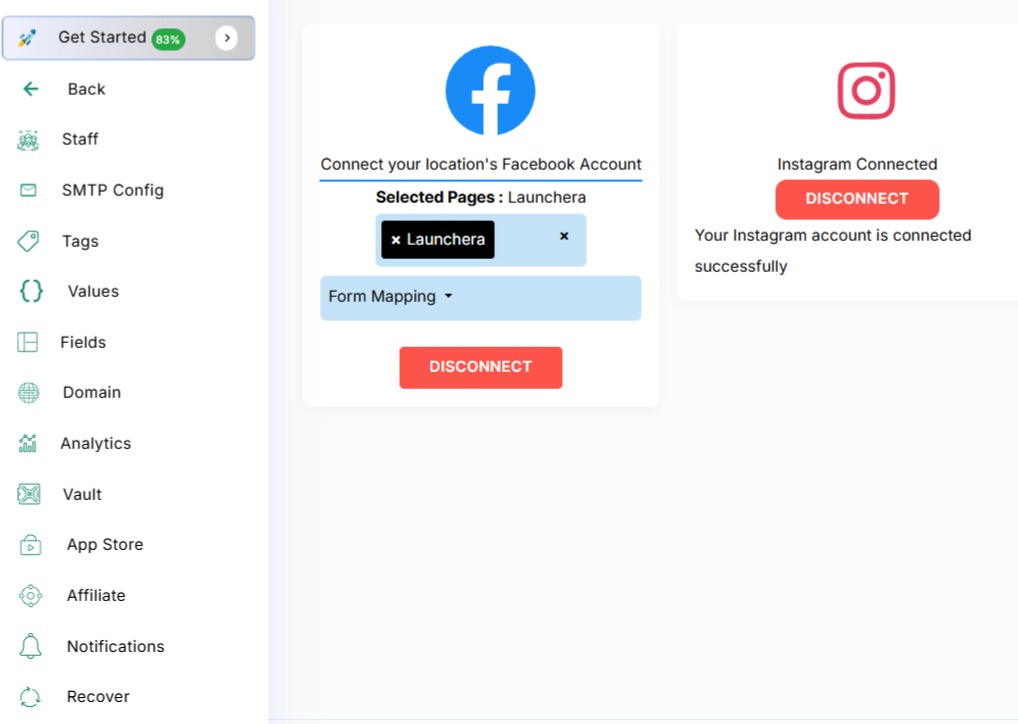
| Step 2 — Connect Instagram | App Store → Instagram Connect | Authorize your Instagram Business account and allow all permissions. | Launchera can now detect DMs, comments, and interactions. |
| Step 3 — Open Automation | Automation → Workflows | Navigate to the workflow section where automation logic is created. | Access to build Instagram automation flows. |
| Step 4 — Create Workflow | Create New Workflow | Name your workflow like “Instagram DM Auto Reply” or “Instagram Comment to DM Flow”. | Workflow structure is ready. |
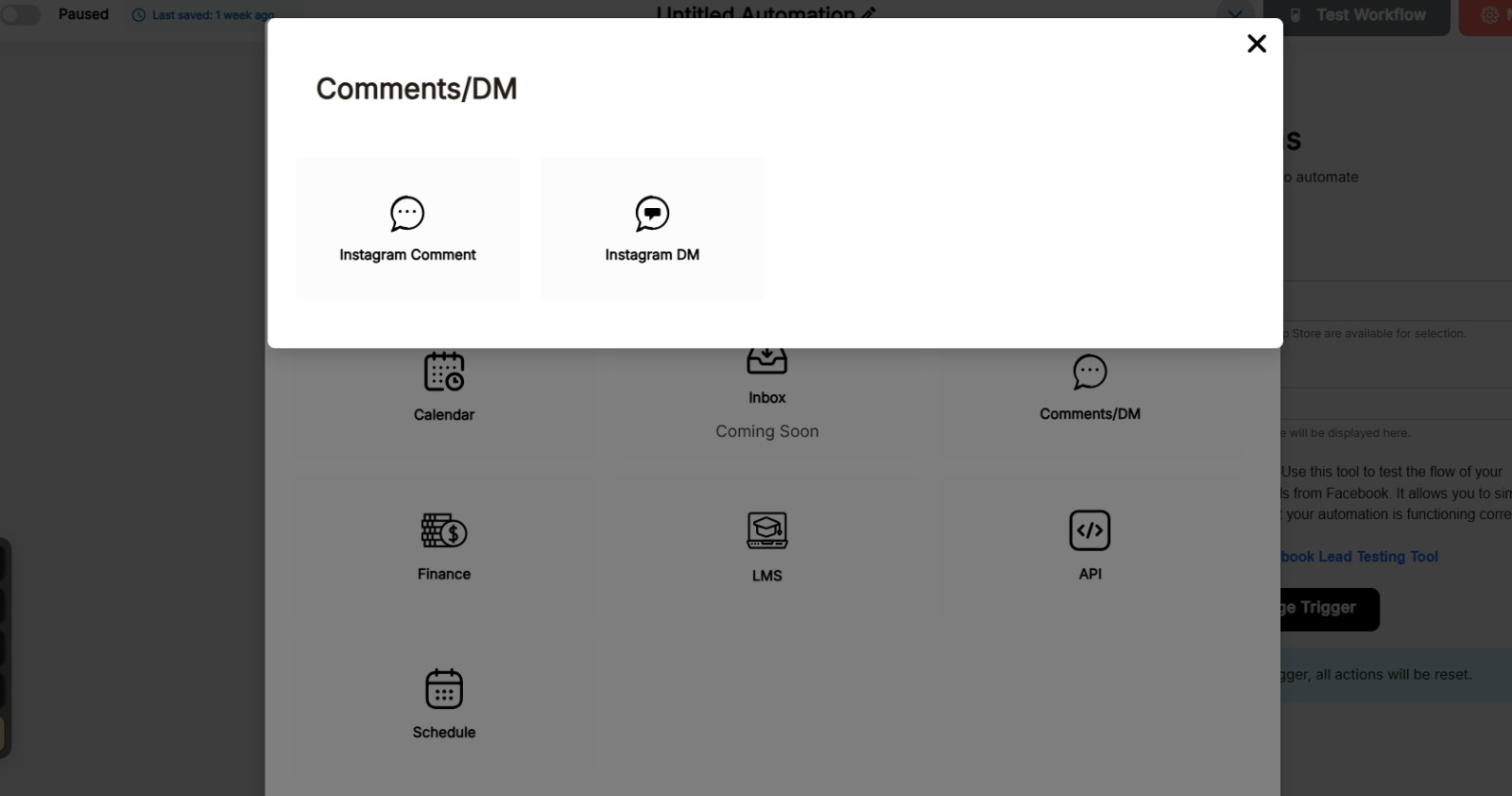
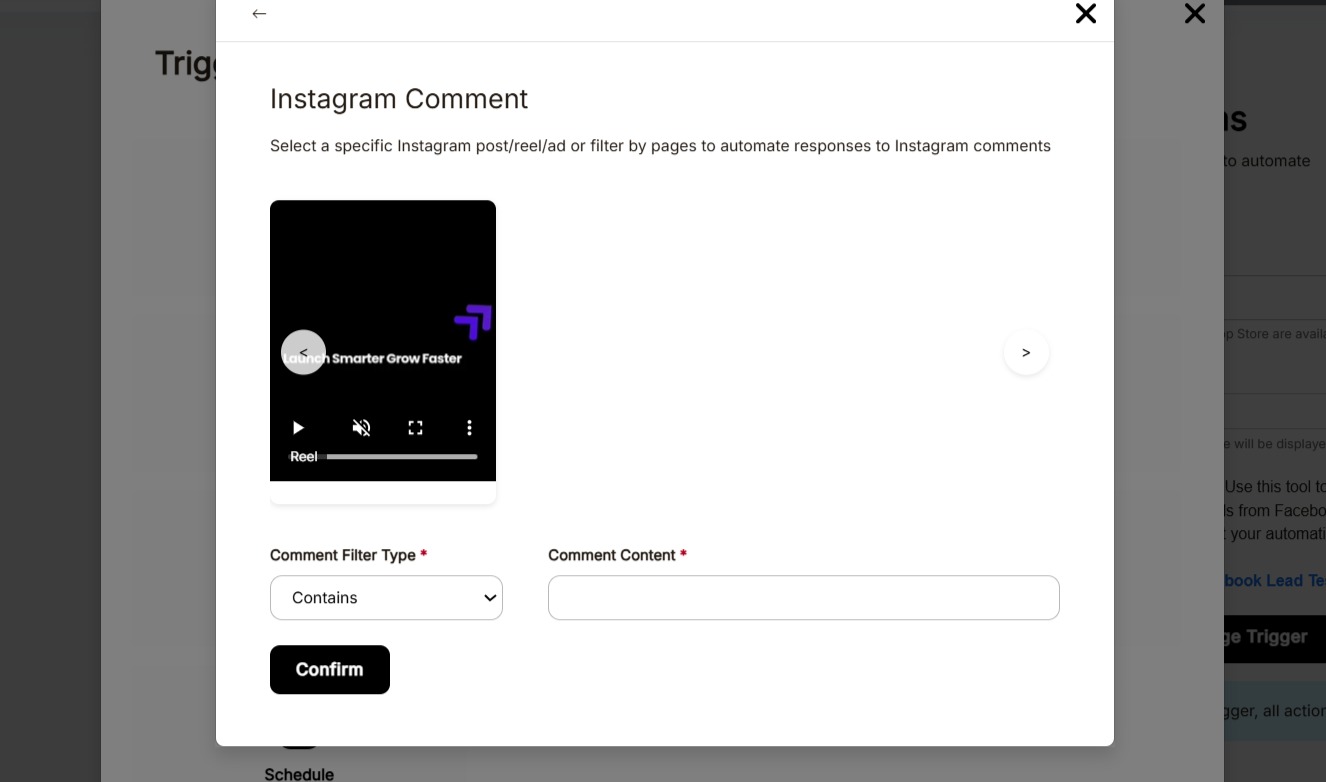
| Step 5 — Choose Trigger | Choose Trigger → Instagram DM / Comment Reply | Select “Instagram DM Received” or “Instagram Comment Reply”. | Automation starts whenever a user interacts. |
| Step 6 — Add Actions | Workflow Actions | Set actions like instant DM reply, asking questions, sharing links, adding to CRM, or WhatsApp/email follow-up. | Turns Instagram engagement into real leads automatically. |
| Step 7 — Activate Workflow | Save → Activate | Save the workflow and turn it ON. | Every DM and comment now triggers instant automated replies and lead capture. |
OR IN OTHER WORDS WE CAN SAY
Understanding Instagram DM automation is important. But setting it up correctly is what turns your Instagram into a real lead machine.
With the Launchera Instagram automation tool, you don’t need coding or technical skills. You can activate Instagram message automation in just a few minutes.
Follow this simple process:
Step 1 — Go to Settings
Log in to your Launchera dashboard and open:
Settings → App Store
This is where you connect external platforms like Instagram to Launchera.
Step 2 — Connect Your Instagram Account
Inside App Store:
Click on Instagram Connect
Authorize your Instagram business account
Allow permissions
Once connected, Launchera can detect DMs, comments, and interactions from your Instagram.
Step 3 — Go to Automation
Now move to:
Automation → Workflows
This is where you create your Instagram automation logic.
Step 4 — Create a New Workflow
Click Create Workflow and give it a name like:
“Instagram DM Auto Reply”
“Instagram Comment to DM Flow”
Step 5 — Choose Trigger
This is the most important step.
Click Choose Trigger and select:
Instagram DM Received (for DM automation)
Instagram Comment Reply (for comment automation)
This tells Launchera when the automation should start.
Step 6 — Add Your Automation Actions
After selecting the trigger, you can define what happens next:
Send an instant DM reply
Ask qualifying questions
Share a link or offer
Add the user into CRM
Trigger WhatsApp or email follow-up
This is how Instagram comment reply automation and Instagram comments automation turn engagement into real leads.
Step 7 — Activate Workflow
Click Save → Activate
Your automation Instagram bot is now live.
From this moment:
Every DM gets an instant reply
Every comment can trigger a private DM
Every interaction becomes a potential lead
Why Instagram DM Automation Is Important
People who send DMs or comment on your posts are high-intent users. They are interested and expect quick replies.
Without Instagram DM automation:
- Messages get missed
- Replies are delayed
- Leads go cold
- Opportunities are lost
With automation, every message gets an instant, professional response—even when you’re offline.
How Instagram Message Automation Works
Instagram message automation follows a simple process:
- A user sends a DM or comments on your post
- The system detects keywords or triggers
- An automatic reply is sent instantly
- The user is guided through a conversation
- Lead details are captured or action is encouraged
This entire flow happens without human effort.
Instagram Comment Reply Automation: Turning Comments into Conversations
Most businesses ignore post comments, but comments are powerful entry points.
With Instagram comment reply automation, when someone comments:
- “Price?”
- “Details please”
- “Interested”
The system automatically:
- Replies publicly
- Sends a DM privately
- Starts a conversation
This turns simple engagement into a potential lead.
Instagram Comments Automation for Lead Capture
Instagram comments automation ensures that no comment is wasted.
Instead of manually replying, automation:
- Identifies keywords in comments
- Sends personalized DMs
- Shares links or information
- Encourages booking, signup, or inquiry
This dramatically increases conversion from your content.
What an Automation Instagram Bot Can Do
An effective automation Instagram bot can:
- Reply to DMs instantly
- Reply to comments automatically
- Send links, offers, or details
- Ask qualifying questions
- Capture name, phone, or email
- Assign leads into CRM
It works like a 24/7 digital assistant for your Instagram account.
How the Launchera Instagram Automation Tool Helps
The Launchera Instagram automation tool goes beyond simple replies.
It connects Instagram automation with:
- CRM
- WhatsApp follow-ups
- Email sequences
- Workflow automation
So when someone interacts on Instagram, they don’t just get a reply—they enter a complete follow-up system.
Benefits of Instagram DM Automation for Businesses
✅ Instant Response Time
Customers receive replies within seconds, increasing trust.
✅ Higher Conversion Rate
Faster replies mean higher chances of conversion.
✅ No Missed Messages
Every DM and comment is handled automatically.
✅ Professional Communication
Consistent, well-written responses every time.
✅ Lead Management Integration
Leads captured from Instagram go directly into your system.
Use Cases for Instagram Automation
Instagram DM automation works extremely well for:
- Coaches and consultants
- Local businesses and salons
- Real estate agents
- Fitness trainers
- E-commerce brands
- Agencies and freelancers
Anyone receiving frequent messages can benefit.
Examples of Instagram Automation in Action
Scenario 1: Comment Trigger
User comments “Send details” → Gets instant DM with offer link.
Scenario 2: DM Trigger
User messages “Price” → Receives automated pricing and booking link.
Scenario 3: Story Reply
User replies to story → Gets guided to appointment booking.
All handled automatically.
Common Mistakes to Avoid in Instagram Automation
- Overly robotic replies
- Long, complicated messages
- No follow-up after first reply
- Not connecting automation to CRM
Good automation feels human and helpful.
Future of Instagram Automation
Instagram automation is evolving with:
- AI-based replies
- Smart keyword detection
- Personalized responses
- Multi-channel integration
Businesses adopting early gain an edge.
Final Thoughts
Instagram DM automation is not about replacing human interaction—it’s about ensuring every interested user gets immediate attention.
By understanding what Instagram automation is, using Instagram message automation, and leveraging tools like the Launchera Instagram automation tool, businesses can convert engagement into real leads automatically.
From Instagram comment reply automation to full Instagram comments automation, this system turns your Instagram page into a lead-generating machine that works 24/7.